
KPWorkSpace
KPWorkSpace integrates AI agents into a unified terminal environment for project-based coding.
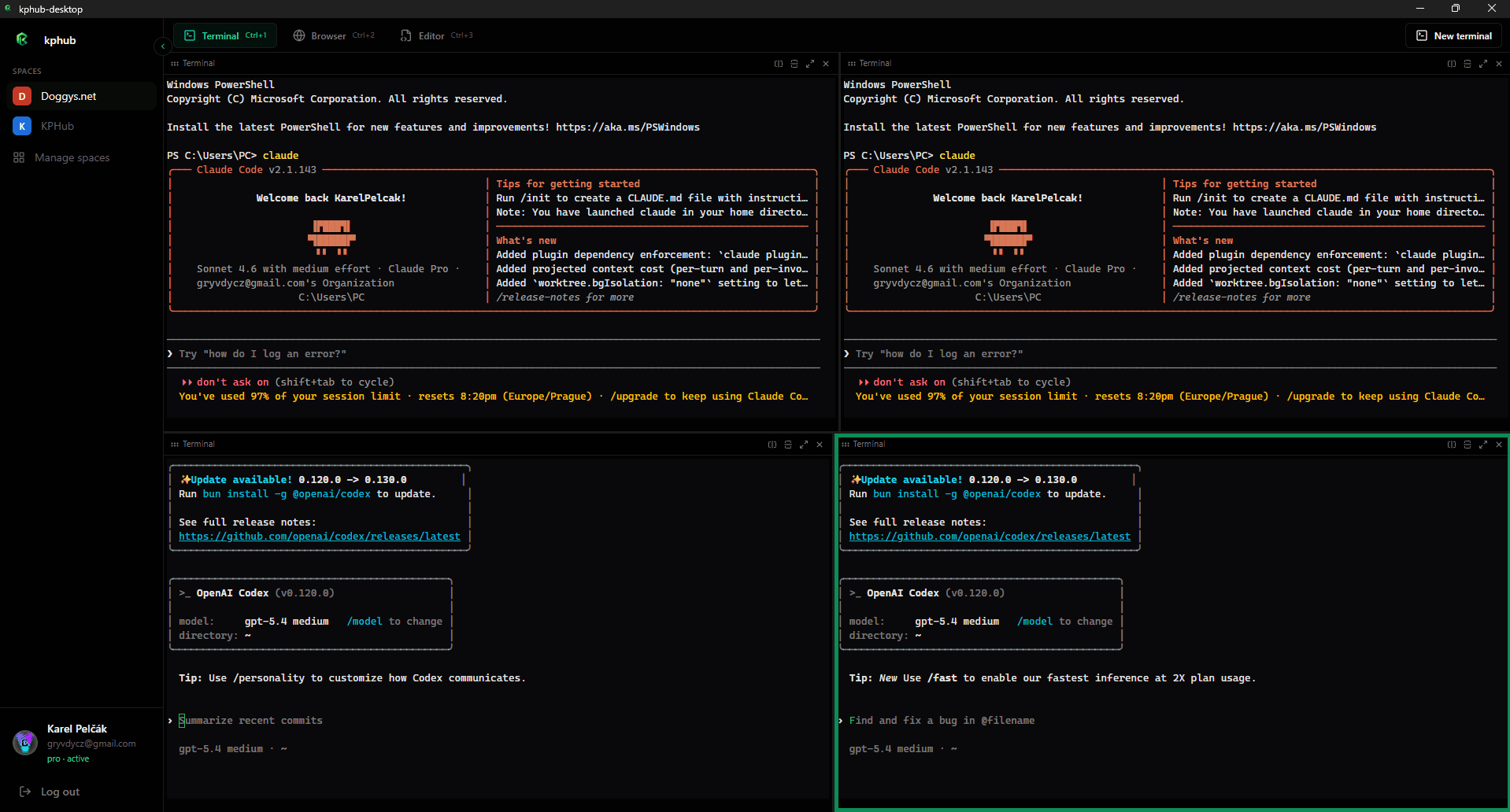
What is KPWorkSpace?
The application creates isolated environments for each project, allowing users to maintain persistent terminal sessions while accessing a code editor and preview browser side by side. Agents can run concurrently in separate panes, supporting parallel workflows that include reviewing outputs and making adjustments in real time. Additional capabilities include an inline git interface for commits and branches, a kanban board for organizing tasks per workspace, and a skills viewer for managing agent configurations. On higher-tier access, features extend to region-based screen captures and voice input for commands. Two subscription options exist, with the lower tier limited to a small number of active spaces and the recommended tier removing those restrictions while adding priority tools for efficiency.
Key features
AI models KPWorkSpace uses
What you can use KPWorkSpace for
Parallel AI Agent Execution
Launch multiple agents such as Claude, Codex, and Gemini in split terminals to run coding tasks concurrently within one project workspace.
Unified Project Environments
Create dedicated spaces per project that include persistent terminals, browser previews, code editing, and git operations without switching applications.
Task Tracking and Version Control
Manage work using the integrated kanban board and inline git client to track tasks, review diffs, and commit changes directly in the workspace.
How to use KPWorkSpace
- 1Create a dedicated project space
- 2Launch an AI agent from the terminal menu
- 3Open additional agents in split panes
- 4Preview changes in the built-in browser
- 5Commit updates using the git client
KPWorkSpace pricing
Pricing model: Paid. Plan details are indicative — check the site for current prices.
Plus
- 2 workspaces
- Persistent terminal sessions
- Browser preview & code editor
- Built-in git client
- Kanban board & skills viewer
Pro
Popular- Unlimited workspaces
- Everything in Plus
- Screenshot capture
- Speech-to-text
- Priority access to new features
Editor's verdict
Pros
- +All-in-one workspace combining agents, terminals, browser, editor, git and kanban
- +Project-specific spaces reduce window juggling
Cons
- –Workspaces limited to 2 on Plus plan
- –Advanced features (screenshots, speech-to-text) require Pro subscription
Our take: KPWorkSpace is a solid coding & dev choice. It's valued for all-in-one workspace combining agents, terminals, browser, editor, git and kanban and project-specific spaces reduce window juggling. The main trade-off is workspaces limited to 2 on plus plan. Best when you need reliable, professional output.
Frequently asked questions
KPWorkSpace is an AI terminal workspace that launches agents like Claude, Codex, and Gemini inside split terminals alongside built-in browser, editor, kanban, and git tools.
Summary
KPWorkSpace is a solid coding & dev choice. It's valued for all-in-one workspace combining agents, terminals, browser, editor, git and kanban and project-specific spaces reduce window juggling. The main trade-off is workspaces limited to 2 on plus plan. Best when you need reliable, professional output.
User reviews
Verified reviews from the community shape this tool's rating.
Loading reviews…
KPWorkSpace alternatives
Similar coding & dev tools worth comparing.


Explore & compare KPWorkSpace
Data-driven comparisons, alternatives and rankings — kept current by our agents.
Featured in