Text Effects AI
Create professional 3D text effects with intuitive AI-driven typography tools.
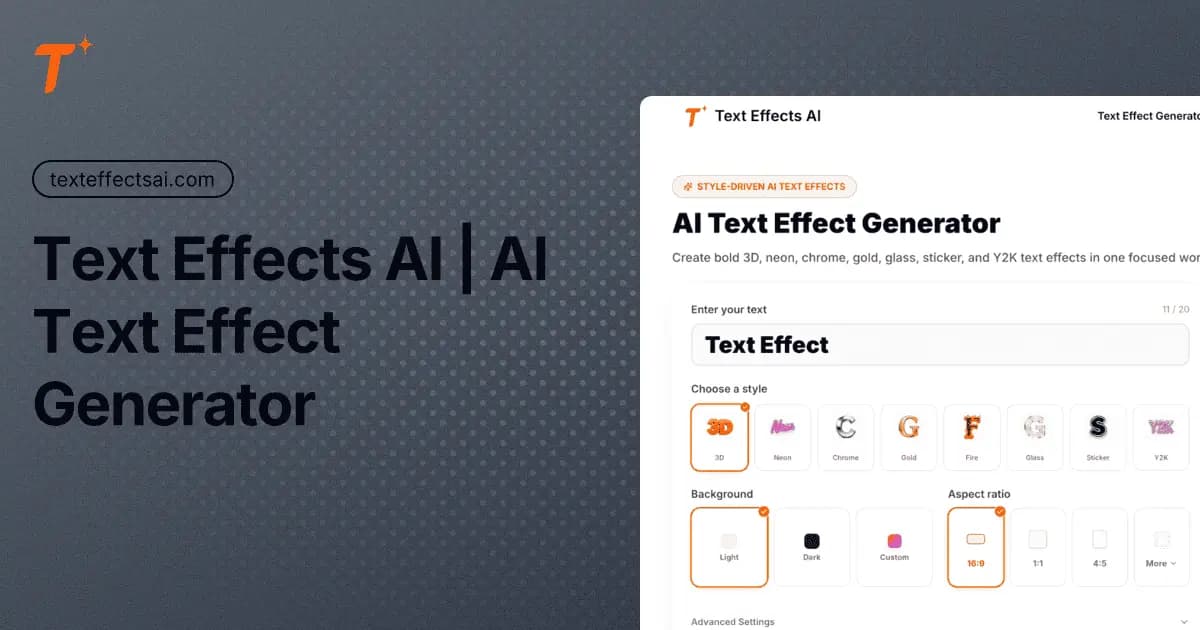
What is Text Effects AI?
The platform enables users to input custom text and select from diverse style presets that simulate realistic lighting, reflections, and depth. Advanced options allow adjustments to backgrounds, aspect ratios, and rendering parameters for tailored outputs. By automating intricate processes like ambient occlusion and environment mapping, the tool reduces the need for manual setup in traditional software. This approach supports efficient experimentation while maintaining clean, readable typography across various visual themes. Professionals apply these effects in content creation for social media, branding, gaming assets, and print materials. The system produces outputs optimized for both digital displays and physical merchandise applications.
Key features
What you can use Text Effects AI for
Social Media Branding
Creators use Text Effects AI to generate bold 3D titles for YouTube thumbnails, Instagram graphics, and TikTok covers with styles like neon cyberpunk and matte clay.
Gaming and Streaming Assets
Streamers and gamers render polished team logos, stream overlays, and branding using metallic chrome or fiery magma presets for professional digital presence.
E-commerce and Print Marketing
Designers create premium web headers, ad typography, and print-ready graphics for T-shirts and merch with high-resolution outputs suitable for physical products.
How to use Text Effects AI
- 1Enter your custom text in the input box
- 2Select a style preset such as neon or chrome
- 3Adjust aspect ratio, background, or use thinking mode
- 4Click generate to render the 3D effect
- 5Review and download the high-resolution output
Text Effects AI pricing
Pricing model: Freemium. Plan details are indicative — check the site for current prices.
Free
- Limited generations (e.g. 11/20 credits)
- Basic style presets
Premium
Popular- Unlimited generations
- Advanced 3D styles
- High-resolution exports
Editor's verdict
Pros
- +Fast generation of complex 3D typography without manual shader setup
- +Accessible alternative to Photoshop or Blender for realistic text effects
Cons
- –Web-only access with no offline or desktop version mentioned
- –Premium styles and higher limits require paid plan
Our take: Text Effects AI is a solid design choice. It's valued for fast generation of complex 3d typography without manual shader setup and accessible alternative to photoshop or blender for realistic text effects. The main trade-off is web-only access with no offline or desktop version mentioned. A good pick if you want capable AI without a high upfront cost.
Frequently asked questions
The tool supports 3D, neon, chrome, gold, fire, glass, sticker, and Y2K styles with physical material simulation.
Summary
Text Effects AI is a solid design choice. It's valued for fast generation of complex 3d typography without manual shader setup and accessible alternative to photoshop or blender for realistic text effects. The main trade-off is web-only access with no offline or desktop version mentioned. A good pick if you want capable AI without a high upfront cost.
User reviews
Verified reviews from the community shape this tool's rating.
Loading reviews…
Text Effects AI alternatives
Similar design tools worth comparing.


Explore & compare Text Effects AI
Data-driven comparisons, alternatives and rankings — kept current by our agents.
Featured in